ProWorkflow vs Smartsheet
A smarter alternative to Smartsheet
Looking for a user-friendly Smartsheet alternative that combines all the essential project management features in a single software?
Unlike Smartsheet, ProWorkflow features built-in time tracking, invoicing, task profitability, and client access, all with an intuitive interface. Access a complete native project management solution without complex add-ons or integrations.
No credit card, no fees
Trusted by thousands of teams worldwide
Join organizations across industries that rely on ProWorkflow to run projects efficiently. Trusted reviews. Proven results.


PROJECTS DELIVERED
TASKS COMPLETED
HOURS TRACKED
REVENUE INVOICED
Third-party integrations that work with other existing tools
ProWorkflow integrates effortlessly with your existing tools to enhance your project management workflow:
- Accounting: Xero, QuickBooks Online, FreshBooks, MYOB Essentials, MYOB AccountRight, KashFlow
- Cloud Storage: Google Drive, Dropbox, Box, OneDrive, SharePoint
- Productivity: Open API (use tools like Zapier to connect with your favourite apps)
Why teams are looking for Smartsheet alternatives
Many teams choose to switch to Smartsheet substitutes due to its limited features and other disadvantages. Here are the top reasons teams change their project management software:
- Smartsheet’s spreadsheet-like interface can be unintuitive for non-technical users or teams unfamiliar with Excel-style workflows. This lacks many necessary project management features for large, complex projects.
- While Smartsheet starts at a moderate price, key features like time tracking, resource management, and customizable dashboards are often only available in higher-tier plans or with add-ons.
- Expense and budget tracking features are also limited without customization or additional tools.
- Lack of customer support means users encountering system issues are left stranded.
Why teams choose ProWorkflow as the best Smartsheet alternative
If you’re looking for a single platform to manage projects efficiently, ProWorkflow is your best Smartsheet alternative. Get advanced project scheduling, project collaboration, and task management tools without having to rely on third-party apps.
Native Time Tracking and Timesheets
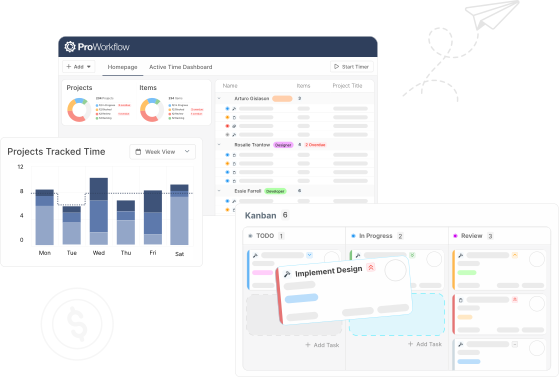
Stay on top of your operations at every level. ProWorkflow features manual time entries, live timers, and integrated timesheets for easy project tracking and task tracking.
Task-Level Profitability and Expense Tracking
Smartsheet users often need to build custom sheets or use formulas to track labor, materials, and other costs per task. Proworkflow gives project managers accurate profitability insights and robust reporting from the very beginning.
Simpler to Use with Less Configuration
Smartsheet’s spreadsheet-like UI can be overwhelming or too technical, especially for new users. ProWorkflow offers a cleaner, visual project management solution that’s easy to navigate, even for non-technical users.
Client Access and Project Collaboration Tools
ProWorkflow provides free dedicated client logins, allowing clients to submit project requests, view project progress, approve quotes, and access collaboration features.
Integrated Quotes & Invoicing
Get End-to-end project and financial management in one place. Generate and send quotes and invoices directly from project data in ProWorkflow.
Worried about switching project management tools?
We get it, change is hard.
That’s why we’ve built tools and guides to make switching from Smartsheet smooth and simple.
It’s easy to move to ProWorkflow as your Smartsheet alternative. Our onboarding team will help migrate your projects, users, and templates with minimal disruption to your workflow.
No credit card, no fees
How does ProWorkflow compare to Smartsheet?
Choose ProWorkflow as your Smartsheet alternative if you need a complete project management system with built-in time tracking, budgeting, task management, and invoicing. It’s ideal for agencies, consultancies, and service-based businesses that want to manage everything in one place.
From smaller teams to large enterprises, businesses across various industries have successfully transitioned to ProWorkflow
Case Studies
Small businesses and large enterprises alike have successfully transitioned to ProWorkflow as their Smartsheet replacement, experiencing improved efficiency, better project oversight, and enhanced profitability.
DBJ Furniture saw a 50% increase in their project capacity.
Case study
Learn how ProWorkflow became winning-software for managing the busy DBJ portfolio
Ara delivers projects 20% faster without a lose in quality.
Case study
Learn how ProWorkflow was a game-changer for Ara since implementation in 2017
Communication, resource planning, project management, reporting, invoicing and time tracking… one amazing solution!
Case study
See how Stage Marketing turned inefficiencies into profitability by measuring labour costs
Frequently Asked Questions
Does ProWorkflow support customizable workflows and task structures like Smartsheet?
Yes. ProWorkflow lets you set up custom task structures, statuses, and categories to fit complex workflows. While it’s not a spreadsheet-style builder, it’s very flexible and intuitive for teams that want structured project phases and processes.
Can I create and reuse templates for projects and tasks in ProWorkflow?
Yes. ProWorkflow lets you set up custom task structures, statuses, and categories to fit complex workflows. While it’s not a spreadsheet-style builder, it’s very flexible and intuitive for teams that want structured project phases and processes.
How customizable are reports and dashboards in ProWorkflow?
Highly customizable. You can build robust reports on tasks, time, financials, staff productivity, and more. Dashboards are also configurable by role, so each team member sees relevant data.
Does ProWorkflow integrate with tools I currently use (e.g., Xero, QuickBooks, Google Workspace)?
Yes, ProWorkflow offers powerful integrations with Xero, QuickBooks, and many other tools through our open API.
What does onboarding and customer support look like during the transition?
ProWorkflow offers free onboarding assistance, data import help, and responsive email/chat support. If you’re looking to move your business operations to an app like SmartSheet, our accessible support team makes it easy to switch over.